Attachments Added at Time of Response
Purpose/Overview
In this article, you’ll learn how the Attachments Added at Time of Response feature works and how it controls which files are sent with outbound responses. This feature allows users to include only the attachments selected at the time a response is sent, rather than automatically including all ticket attachments. It is designed for users who need greater control over outgoing communications, helping reduce unnecessary attachments and ensuring only relevant files are shared.
Navigation Path:
To access this feature: Utilisphere > System Management > Administration > Ticket Management > Excavator Positive Response Settings
Things to Know:
Mutually Exclusive Setting
- This option cannot be enabled alongside Ticket Attachments
- Only one of these options can be selected at a time
Select All Behavior
- If a “Select All” configuration is used, the system defaults to standard Ticket Attachments
Attachment Source
- Only attachments selected during the response process are included
- Attachments are captured exactly as they exist at the time the response is processed
Sketches and Generated Content
- Sketches are not included as separate attachments
- Sketch content may still appear within templates or generated documents (such as PDFs)
Message Template Behavior
- Message templates (including auxiliary templates) still function as expected
- Template content, including sketches, will populate within the generated output
- Files referenced in templates are not appended separately to the email
Key Benefits/Use Cases:
Controlled Outbound Communication: Prevent sending unnecessary or excessive attachments by selecting only the files needed for each response.
High-Volume Attachment Tickets: Ideal for tickets that accumulate many attachments, where only a subset should be shared externally.
Cleaner Emails and Reduced File Size: Helps reduce email clutter and improves deliverability by limiting attachment volume.
How It Works:
Follow these steps to setup or enable:
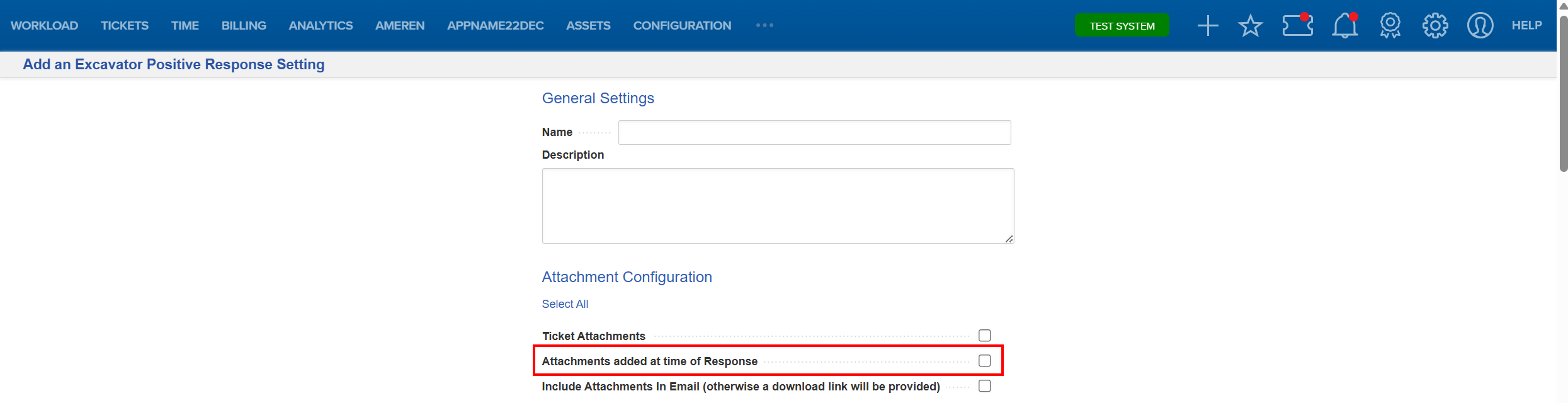
- Navigate to System Management > Administration > Ticket Management > Excavator Positive Response Settings.
- Add an Excavator Positive Response Setting or select an already existing setting you want to work with.

- Check the Attachments added at time of Response box.
- Save your changes.
When sending a response:
- Select the specific attachments you want to include
- Send the response
- Only the selected attachments will be included in the outgoing message
FAQ/Troubleshooting:
Q: Why can’t I select both Ticket Attachments and Attachments Added at Time of Response?
A: These settings are mutually exclusive. You must choose one or the other.
Q: Are sketches included as attachments when this feature is enabled?
A: No. Sketches are not added as separate attachments, but they may still appear within generated templates or PDFs.
Q: Why aren’t all ticket attachments included in my response?
A: This feature only includes attachments selected at the time of sending. Any unselected files will not be included.
Q: Do message templates still work with this feature enabled?
A: Yes. Message templates continue to populate as expected, including any embedded content, but attachments are not appended separately unless selected.
Questions? Contact us!

Was this article helpful?
That’s Great!
Thank you for your feedback
Sorry! We couldn't be helpful
Thank you for your feedback
Feedback sent
We appreciate your effort and will try to fix the article