Invalid Response Monitoring
Purpose/Overview
In this article, you will learn how to identify tickets containing invalid responses that should not have been available for selection based on the configured registration code, customer, or group restrictions.
This feature provides administrators with centralized visibility into tickets that contain responses that violate response configuration rules. By identifying these records, administrators can proactively address potential compliance risks before invalid responses are transmitted to external systems such as clients, excavators, or one call centers.
Navigation Path:
To access this feature, go to: Utilisphere > System Management > Administration > Ticket Management > Invalid Response Audit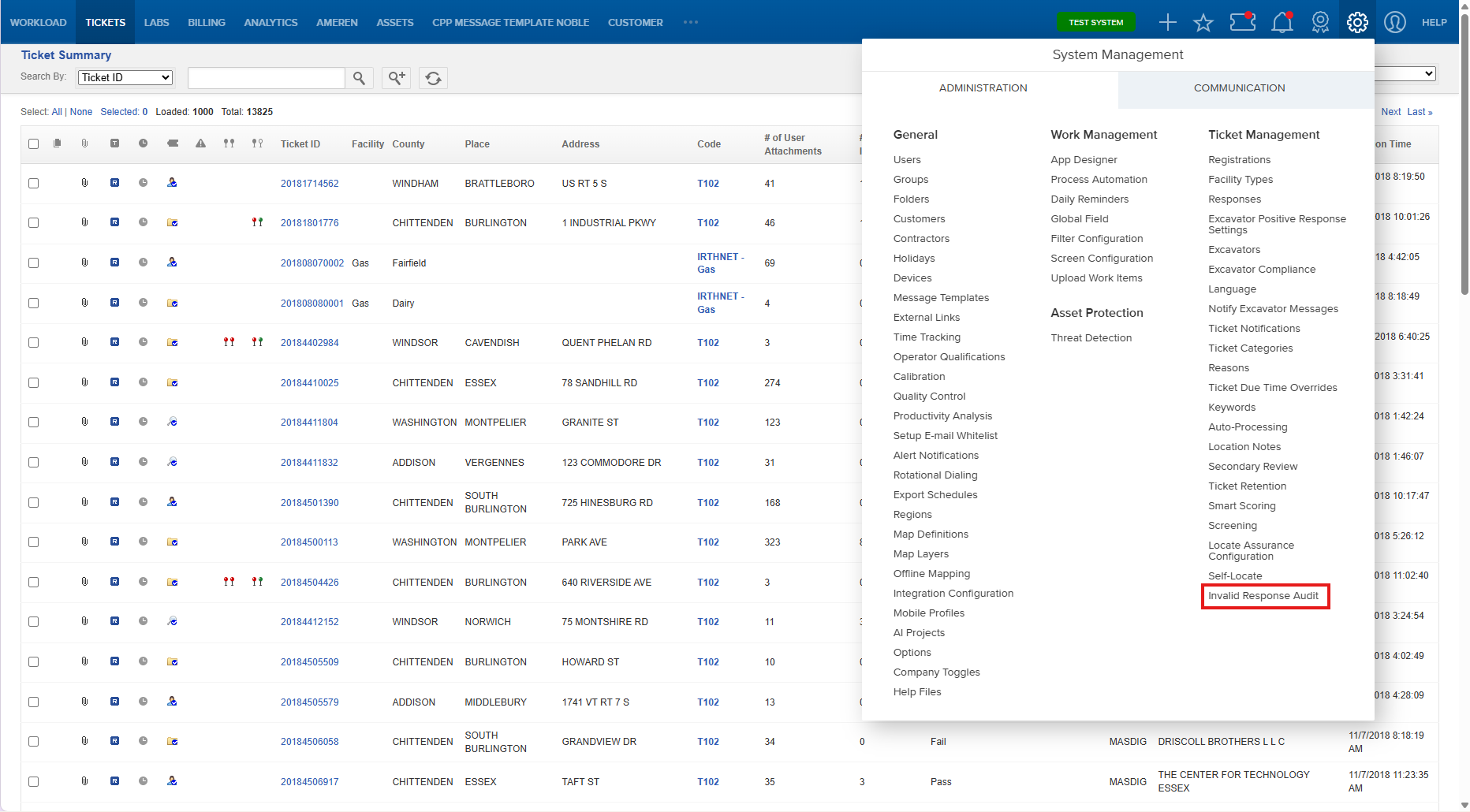
The Invalid Response Monitoring screen displays tickets containing response selections that do not align with configured registration code, customer, or group restrictions.
Things to Know:
- This feature identifies tickets that contain responses that should not have been selectable based on response configuration rules.
- Invalid responses may occur due to data inconsistencies, configuration changes, or application issues.
- The monitoring view eliminates the need to create and maintain multiple custom screens and filters.
- The list automatically identifies tickets with potentially invalid response combinations.
- Administrators can review identified tickets and take corrective action before responses are sent to external systems.
- Monitoring invalid responses can help reduce compliance risks, damages, and potential fines.
- The feature provides visibility across registration code, customer, and group response restrictions.
Key Benefits/Use Cases:
- Improve Compliance Oversight: Quickly identify tickets containing invalid responses before they create regulatory or contractual compliance concerns.
- Reduce Administrative Effort: Eliminate the need to maintain multiple screens, filters, and reporting configurations to monitor response validity.
- Prevent Incorrect Notifications: Review and correct invalid responses before they are transmitted to clients, excavators, one call centers, or other external systems.
How It Works:
Response availability is often configured based on registration codes, customers, groups, or other business rules. In some situations, a response may be recorded on a ticket even though that response was not permitted for the selected code, customer, or group.
The Invalid Response Monitoring feature continuously evaluates ticket responses against current response configuration rules and identifies records where invalid combinations exist.
Administrators can use the resulting ticket list to investigate, correct, and resolve issues before they impact external communications or compliance obligations.
- Responses are configured for specific registration codes, customers, and groups.
- Tickets are processed and responses are selected by users or external processes.
- The system evaluates ticket responses against the configured restrictions.
- Tickets containing invalid response combinations are identified.
- Administrators review the affected tickets.
- Corrective action can be taken before responses are transmitted to external systems.
Information Available for Review
Administrators can review tickets that contain:
- Invalid registration code and response combinations.
- Invalid customer and response combinations.
- Invalid group and response combinations.
- Responses that are not currently permitted based on configuration rules.
- Potential compliance-risk tickets requiring attention.
Example Scenario
An organization restricts certain responses so they can only be used for specific registration codes and customer groups. Due to a system issue or configuration change, a restricted response is applied to a ticket where it is not permitted.
The Invalid Response Monitoring feature identifies the affected ticket and displays it in the monitoring view, allowing an administrator to investigate and correct the issue before the response is delivered to external stakeholders.
FAQ/Troubleshooting:
Q: Why is a ticket appearing in the Invalid Response Monitoring view?
A: The ticket contains a response that does not match the currently configured registration code, customer, or group restrictions.
Q: Does this feature prevent invalid responses from being selected?
A: No. This feature provides visibility into invalid response combinations so administrators can identify and address potential issues.
Q: Why is this feature useful if response restrictions are already configured?
A: Configuration changes, data inconsistencies, or application issues may result in responses being associated with tickets where they are not allowed. This feature helps identify those exceptions.
Q: What risks can invalid responses create?
A: Invalid responses may result in inaccurate information being transmitted to clients, excavators, one call centers, or other external systems, potentially creating compliance, operational, or financial risks.
Questions? Contact us!

Was this article helpful?
That’s Great!
Thank you for your feedback
Sorry! We couldn't be helpful
Thank you for your feedback
Feedback sent
We appreciate your effort and will try to fix the article